

Almost every modern flight controller running Betaflight includes many sensors these days such as a current sensor and voltage sensor. Often these sensors come calibrated from the factory, but they are either not accurate, or require recalibration for your unique setup. These are some of the most important sensors in your quad, because they let you know how your battery is performing and how much flight time you have left. A poorly calibrated sensor could cause over-discharging of your battery, or an incorrect reading during a vital time in your flight.
Types of Current Sensors
In Betaflight, there are two types of current sensors: physical, actual current sensors (shunt resistors) built into the flight controller; and virtual current sensors. The latter being a calculated value based on the readings from your voltage sensor and motor power output. Because virtual sensors are only estimated, they aren’t very accurate and unfortunately not much use to us as they can’t be relied on.
Calibration of the Betaflight Voltage Sensor
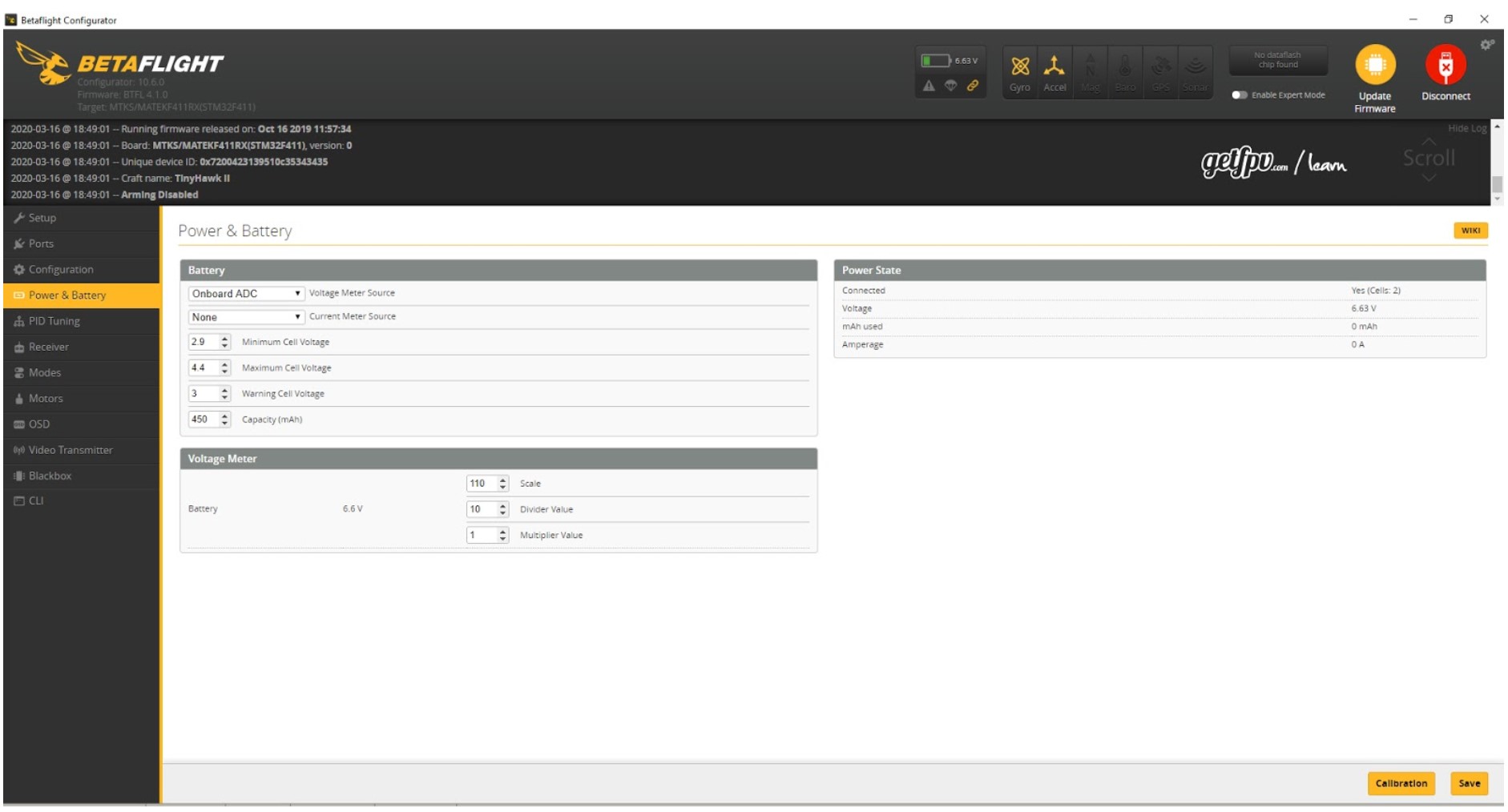
Arguably the most important sensor, the voltage sensor must be calibrated to ensure an accurate battery level reading. The voltage sensor is usually prominently displayed on the OSD while flying. If this level is wrong, you can calibrate it in Betaflight by connecting your quad and heading to the Power & Battery tab and plugging in a battery. On the right side, you’ll see the voltage of the connected battery.
Today I’m demonstrating how to set the voltage of a 2-cell battery on my TinyHawk 2 Micro Drone.
You’ll now need to measure the actual voltage (while plugged in!) of the battery by using a cell checking device or voltmeter. We recommend this one. Now adjust the Betaflight voltage by changing the scale in the Voltage Meter box until the voltages are the same. Ensure you press the Save button to see the changes take effect. Your voltage meter is now calibrated![ultimate_spacer height=”30″][vc_single_image image=”6055″ img_size=”full” alignment=”center” onclick=”link_image”][ultimate_spacer height=”30″][vc_row][vc_column][vc_column_text]
Calibration of the Betaflight Current Sensor
The sensor in your Betaflight quad allows you to see the actual capacity of the battery used while flying. This is super handy because you’ll be able to accurately see how much of your battery has been used rather than guessing from the voltage which could be experiencing voltage sag. This means you can land all of your batteries at exactly the same capacity used.
Calibrating the current sensor is a little bit more tricky than the voltage sensor because you’ll need to take some readings after flying and will need a charger which is capable of telling you the milliamps that have been charged into your battery. The theory is, you will fly and measure the mAh reading from Betaflight, and at the end of the pack, unplug and write it down somewhere. Later you will use this value to compare against the reading from your charger. You may need to repeat this process several times to get a completely accurate reading.
We’ll use this formula to calculate our new scale in Betaflight:
New scale = old scale * (Betaflight mAh consumed / Charger current charged).
Here’s a handy calculator which has been made to do the math for you. [/vc_column_text][ultimate_spacer height=”30″][vc_single_image image=”6054″ img_size=”full” alignment=”center” onclick=”link_image”][ultimate_spacer height=”30″][/vc_column][/vc_row][vc_row][vc_column][vc_column_text]
Conclusion
Calibrating your Betaflight sensors is a really important step while setting up a new quad. Having accurate sensors means you’ll have complete transparency on how your drone battery is performing while flying and ensures you’ll be able to land your batteries at safe voltages which don’t cause any damage.